Descript, VEED or OpusClip for turning a long video into captioned clips: who automates what, and where you step in
Which of Descript, VEED and OpusClip to shortlist for cutting a webinar or podcast into captioned vertical clips, and where a person still has to step in.
Long video to short clips: what each vendor's public pages document at each step
| Criterion | Descript | VEED | OpusClip |
|---|---|---|---|
| Selecting moments | Create clips and highlights tool; transcript editing. Selection criteria not detailed.[3] [4] | AI Clip Generator named on homepage; method and settings not described in captured pages.[5] [6] | Copilot, clip length, topic search, prompt-to-clip, re-prompt and virality score, depending on plan.[1] [2] |
| Reframing | Center Active Speaker tool listed; ratios and tracking not detailed.[3] [4] | Not described in captured pages; to confirm.[5] [6] | ReframeAnything with object tracking; 9:16 on Free and Starter, more ratios on Pro.[1] [2] |
| Captions and editing | Unlimited dynamic captions, 25-language transcription, text editing with timeline.[3] [4] | Unlimited auto subtitles from Creator, 50+ language translation from Pro, brand kits.[5] [7] | Editable auto captions, animated templates, text and timeline editing by plan.[1] [2] |
| Exports and cost | Free, then from $16 per person; media hours and AI credits; 720p to 4K; timeline export.[3] [8] | $12, $22 or $39 per user per month billed annually; AI credits; export formats not detailed.[5] [7] | Free, $15 Starter, $29 Pro, custom Business; Premiere Pro and DaVinci export by plan.[1] [2] |
Sources
Short answer: three tools, three starting points
If you want software to propose the moments, shortlist OpusClip first. If you prefer to edit a recording through its transcript and keep a route into a traditional editor, shortlist Descript. If your priority is captions, brand kits and general editing in the browser, VEED belongs on the list, but its public pages say less about automatic clip selection.
The product pages describe features. They do not publish comparable tests of clip quality, so nothing here ranks the three. Use this article to decide which two tools deserve a trial on your own recordings. In every case, someone still has to check the result before it is published; that is an editorial recommendation, not a vendor statement.
Sources: opus.pro · descript.com · veed.io · Opusclip (usedby.ai) · Descript (usedby.ai) · Veed (usedby.ai)
Step one: finding the moments worth clipping
OpusClip is the tool whose public pages say the most about selection. The pricing page lists, depending on the plan, an AI copilot, a choice of clipping timeframe and clip length, topic search, prompt-to-clip, re-prompting to refine results and a virality score. Clip length bands run from under one minute up to fifteen minutes. The homepage presents ClipAnything, which the vendor says works on any genre and accepts a natural-language request for a specific moment. Those are vendor claims, not independent tests.
Descript works differently. Its pricing page lists a Create clips and highlights tool, plus Remove Retakes and Edit for Clarity. Its homepage explains that deleting a word in the transcript deletes that moment of video. The pages reviewed do not detail how Descript chooses highlights, so plan for a person to read the transcript and decide.
For VEED, the homepage tool list includes an AI Clip Generator, but the captured pages do not describe how it selects moments or which settings it offers, and the pricing page does not mention it. That is unknown, not absent. Confirm it before counting VEED as a clip-finder.
Sources: opus.pro · Opusclip (usedby.ai) · descript.com · Descript (usedby.ai) · veed.io · Veed (usedby.ai)
Step two: reframing for vertical formats
OpusClip presents ReframeAnything, which the vendor says keeps moving subjects centered with object tracking, with a manual tracking option for more control. The pricing page lists 9:16 on the Free and Starter plans and 9:16, 1:1 and 16:9 on Pro, with layout switching, screenshare or gameplay layouts and custom reframing varying by plan.
Descript lists a Center Active Speaker tool, and its homepage mentions reformatting for YouTube, TikTok and LinkedIn. Available ratios and tracking of moving subjects are not detailed. VEED's captured pages do not describe automatic reframing to vertical formats; that capability remains to be confirmed, and you cannot conclude it is missing. A person should watch every reframed clip, especially with two speakers or a shared screen.
Sources: opus.pro · Opusclip (usedby.ai) · descript.com · Descript (usedby.ai) · veed.io · Veed (usedby.ai)
Step three: captions and editing
VEED is strongest on documentation here. Its pricing page lists unlimited auto subtitles from the Creator plan, translation into 50+ languages from Pro, multiple brand kits on Pro and custom templates on Studio. The homepage stresses dynamic subtitles and applying colours, fonts and logos automatically.
Descript lists dynamic captions as unlimited, transcription in 25 languages and text-based editing with a timeline for fine control. Translation and dubbing with proofreading in 30+ languages appear on the Business plan. OpusClip says captions are added automatically and are editable, citing accuracy above 97% (a vendor figure), and lists animated caption templates plus text and timeline editing by plan. Its catalogue entry lists English, German, Spanish, French and Portuguese, while the homepage names a longer list.
Whatever the tool, proofreading names, jargon and translations remains manual work. That is our recommendation, since none of the vendors promises error-free captions.
Sources: veed.io · Pricing (veed.io) · descript.com · Descript (usedby.ai) · opus.pro · opus.pro · Veed (usedby.ai) · Opusclip (usedby.ai)
Step four: exports, limits and cost
Descript's pricing page shows Free at $0 and paid plans from $16 per person per month (Hobbyist), then Creator and Business, with two price points per plan depending on billing. Limits are in media hours and AI credits: 10 hours and 400 credits on Hobbyist, 30 and 800 on Creator, 40 and 1,500 on Business. Export runs from 720p to 4K, and timeline export goes to Premiere, Final Cut, DaVinci Resolve and other editors. The integrations page confirms those targets.
OpusClip lists Free at $0, Starter at $15 a month, Pro at $29 and a custom Business plan. Watermark-free export, media retention, bulk export and export to Premiere Pro and DaVinci Resolve depend on the plan, and uploaded media expires after a set period on lower plans. The homepage mentions a 7-day Pro trial and a free plan with monthly processing minutes.
VEED lists Creator at $12, Pro at $22 and Studio at $39 per user per month, billed annually, with Enterprise on request. Pricing is based on AI credits. The captured page does not detail export formats or resolutions. On security, Descript states SOC 2 Type II, and VEED states that its servers are in the EU.
Sources: descript.com · Integrations (descript.com) · Pricing (descript.com) · opus.pro · Pricing (opus.pro) · Pricing (veed.io) · Security (veed.io) · Security (descript.com)
What customer examples show, and what they cannot
The most detailed case is Descript's SaaStr story. Before, SaaStr used outside vendors, and a contractor watched whole videos to note timestamps for clips. Now the team edits raw files itself, highlights good quotes in the transcript while editing, then exports and adds captions. Descript reports that SaaStr publishes three to four videos a day, repurposed 78% of its content and doubled production. These are vendor-reported results for one team.
The lesson is that a person still picks the quotes; the transcript simply makes picking quick. OpusClip's homepage features creators such as Jacksfilms, who says it helps upload more short videos, and WildBrain, which says it brings down the cost of short-form clips. For VEED, PandaDoc reports LinkedIn impressions on its first videos and CurrentBody says production went from weeks to hours. These are testimonials, not like-for-like measurements, so do not compare them.
Sources: Saastr (descript.com) · descript.com · opus.pro · opus.pro · veed.io
Who to shortlist, and what to test
Choose OpusClip and Descript if the main job is finding clips in long recordings and you want either AI proposals (OpusClip) or transcript control with timeline export (Descript). Add VEED if captions, brand kits and general browser editing matter more, if your team already uses it, or if EU hosting is a requirement.
Editorial recommendation: run one recording of your own through your two finalists and compare three things: whether the proposed or chosen moments stand alone, whether a speaker stays framed, and how many caption corrections you make. The pages cannot answer those questions.
Sources: opus.pro · descript.com · veed.io · Opusclip (usedby.ai) · Descript (usedby.ai) · Veed (usedby.ai)
Method and limits
2026-10-15
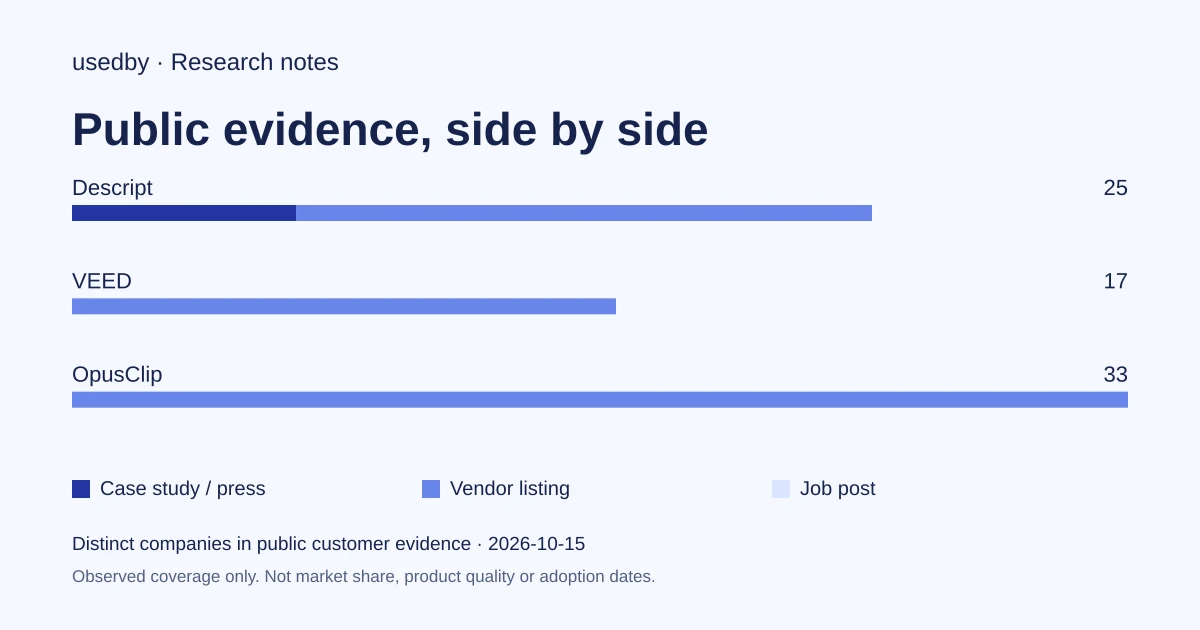
This dated snapshot counts distinct companies in public customer evidence. CONFIRMED means a case study, named testimonial or press source; OBSERVED means a vendor listing; SIGNAL means a job post. All three count, but their strength differs. Removed and unlevelled lines are excluded. Examples are a capped selection verified within 90 days. Vendor facts are sourced records checked within 60 days. Coverage is uneven and missing evidence is unknown. These figures measure neither market share nor product performance; capture dates are not adoption dates.
Sources
- opus.proopus.pro
- descript.comdescript.com
- veed.ioveed.io
- Pricing (veed.io)veed.io
- Integrations (descript.com)descript.com
- Pricing (descript.com)descript.com
- Pricing (opus.pro)opus.pro
- Security (veed.io)veed.io
- Security (descript.com)descript.com
- Saastr (descript.com)descript.com
Questions
Which tool finds the best moments automatically?
OpusClip documents the most selection controls: topic search, prompts, clip length and a virality score, depending on plan. Descript offers a clips tool but centres on transcript editing, and VEED's pages do not describe its clip generator. None of the pages measure clip quality, so test on your own footage.
Do I still need to edit by hand?
Plan on it. Even in SaaStr's Descript workflow, people highlight the quotes and check the edit. Reframing, caption wording and translations are worth reviewing in all three tools. This is an editorial recommendation, not a vendor claim.
Can I start for free with each of them?
Descript and OpusClip both list a free plan or trial, and OpusClip's homepage mentions a 7-day Pro trial. VEED's pricing page says to start for free and lists paid plans from $12 per user per month billed annually. Limits differ, so read each plan before comparing.
Can I finish the clips in Premiere or DaVinci Resolve?
Descript documents timeline export to Premiere, Final Cut, DaVinci Resolve and other editors. OpusClip lists export to Premiere Pro and DaVinci Resolve on certain plans. VEED's captured pages do not detail such exports.
Tools in this article



Explore the data
Who uses which AI tool, and how each line was found.