Fellow or tl;dv: which turns meetings into shared follow-up, from preparation to actions?
Fellow and tl;dv both capture, summarize and push actions out. Here is where their documented preparation, sharing, permissions and pricing differ.
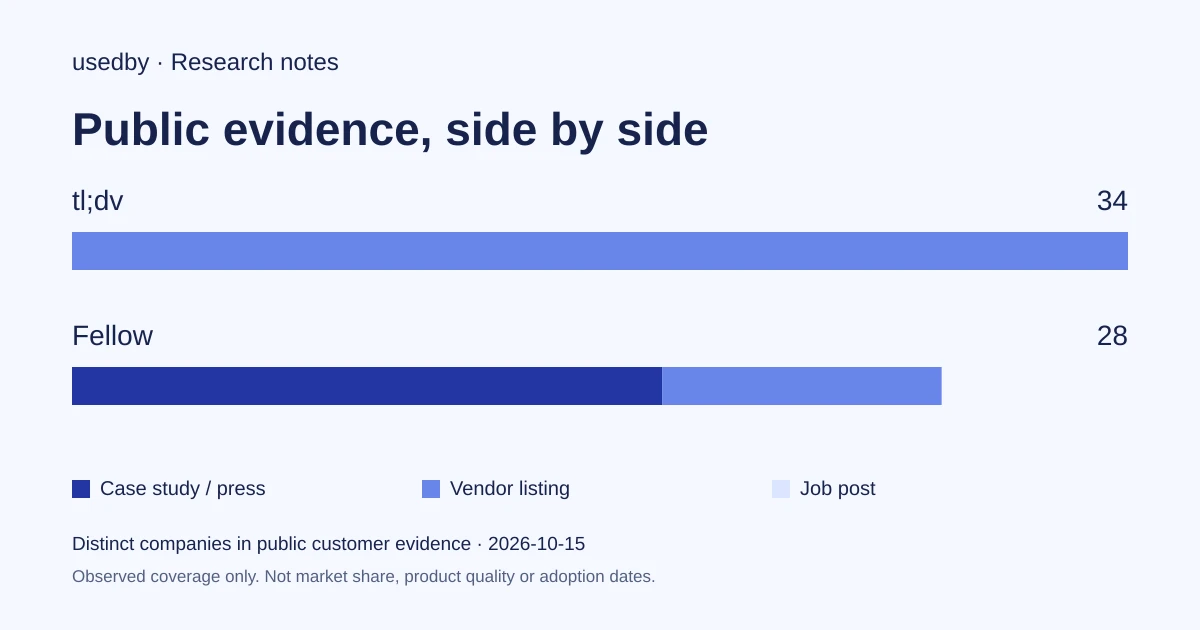
Fellow and tl;dv on four steps of the meeting-to-follow-up path, as described on vendor pages
| Criterion | tl;dv | Fellow |
|---|---|---|
| Capture and summaries | Zoom, Meet, Teams; notes in 30 languages; templates; capture from the device without a bot.[2] | Zoom, Teams, Meet and in person; bot or botless via desktop app; summaries and action items.[1] |
| Preparation and follow-up | Action-item assignment, follow-up emails, scheduled multi-meeting reports on Business.[4] | Pricing page lists collaborative agendas, pre-meeting reminders, due dates and multiple assignees on actions, by plan.[3] [1] |
| Sharing and integrations | Slack, Monday.com, HubSpot, Pipedrive, Drive, Discord, 5,000+ apps via Zapier.[5] | Salesforce, HubSpot, project tools, Claude, Zapier, MCP, Global Relay.[1] |
| Permissions and price | SOC 2 Type II stated; SSO; $0, $18, $29 per seat per month, Enterprise on request.[6] [4] | Rule-based recording policies and redaction (Enterprise); $0, $7, $15, $25 per user per month.[3] [1] |
Sources
The shared job: a meeting that leaves a trail the team can find
Fellow and tl;dv both record or capture Zoom, Google Meet and Microsoft Teams calls, transcribe them, write summaries and send the outcome to other tools. So the useful question is not which one takes notes. It is which one fits how your team prepares, shares and tracks decisions.
Their own pages show different centres of gravity. Fellow presents itself as a secure meeting assistant for enterprise and regulated sectors, with retention, redaction and audit controls. tl;dv presents multilingual notes, CRM updates, reports across many meetings and sales coaching. Neither is a universal winner; the right pick depends on what your team cares about most.
Sources: fellow.ai · Fr (tldv.io)
Capture and summaries: bot or no bot, languages, action items
Fellow says it captures Zoom, Teams, Google Meet and in-person meetings, with transcript, audio and video in one place, context-aware summaries and automatically identified action items. Botless capture runs through its desktop app on Mac and Windows, and there is a mobile app. Its pricing page lists transcription in more than 100 languages.
tl;dv says it generates notes in 30 languages, a video recording, a translatable transcript and a shareable summary, with templates such as MEDDIC or your own. It also describes capture from your device without adding a participant to the call. Its pricing page lists a three-hour recording limit and custom bot appearance on paid plans.
Both therefore cover bot and botless capture, summaries and extracted actions. Real transcription accuracy on your accents, jargon and audio is not something these vendor pages can show, so it needs your own test.
Sources: fellow.ai · Fr (tldv.io) · Pricing (tldv.io)
Preparation and follow-up: where Fellow's agenda habit shows
Fellow's published customer stories centre on preparation. At Nintex, a VP of Engineering replaced sticky notes with talking points added ahead of each meeting; teammates sometimes answered in comments, and a twice-weekly standing meeting became asynchronous, according to the vendor's case study. At Jacaranda Finance, action items that used to be copied from a Google Doc into Trello are now assigned inside Fellow, and the team runs a no-agenda, no-meeting rule.
Volley moved from Notion to Fellow because it appears inside Google Meet and Zoom, and uses Slack-connected automations as reminders. Its VP of Client Success says the team found some update-only meetings could go. These are vendor-published, self-reported accounts, not comparable measurements. They show a pattern: Fellow is used as a place to build the agenda, take notes and track actions before and after each call.
tl;dv's pricing page points elsewhere. Pro lists AI action-item assignment, a follow-up email drafter and custom note templates. Business adds scheduled AI reports, multi-meeting insights and playbook monitoring, and the homepage describes weekly digests of recent meetings. Collaborative agendas are not listed for tl;dv on its pricing page. No tl;dv customer workflow is described here.
Sources: Nintex (fellow.ai) · Jacaranda finance (fellow.ai) · Volley (fellow.ai) · Fr (tldv.io) · Pricing (tldv.io)
Sharing and integrations
Fellow lists CRM sync with Salesforce and HubSpot, action items pushed to Asana, Jira, Linear, ClickUp, Trello and GitHub, and connections to Claude, Zapier, Glean, an MCP server and Global Relay archiving. Its pricing page mentions public note links and guest users on some plans. Gamesight's case study shows a lighter use: managers share selected one-on-one notes with the Chief of Staff without opening all their notes, and action items go to Monday boards.
tl;dv's integrations page features Slack, Monday.com, HubSpot, Pipedrive, Google Drive, OneDrive and Discord, plus more than 5,000 apps through Zapier. Its pricing page lists shareable clips, team shared libraries, and, from Pro, an MCP server, API and webhooks. Clips and libraries suit teams that circulate key moments rather than whole notes.
Sources: fellow.ai · Gamesight (fellow.ai) · Integrations (tldv.io) · Pricing (tldv.io)
Permissions, retention and price
This is where Fellow documents the most. Its privacy page describes recording rules based on external attendees, domains or title keywords, pre-meeting disclosure emails, pause and resume, separate retention for recordings and transcripts, immediate deletion and transcript redaction. Auto-record rules and redaction are marked Enterprise. Retention applies workspace-wide with no user overrides. Fellow also states that it does not train models on meeting data by default.
tl;dv states SOC 2 Type II, GDPR alignment, SSO, AES-256 encryption and no use of customer data for AI training. Enterprise adds SCIM, custom SSO, privately hosted AI and organization activity logs. Its Free plan keeps data for up to three months.
Pricing, billed annually: Fellow is $0, $7 (Team), $15 (Business) and $25 (Enterprise, starting at 10 users) per user per month; its Free plan allows five AI notes per user, lifetime. tl;dv is $0, $18 (Pro) and $29 (Business) per seat per month, with Enterprise on request; its Free plan limits AI notes to 10 meetings. Per-seat price alone does not tell you total cost, since features sit at different tiers.
Sources: fellow.ai · Privacy controls (fellow.ai) · Security commitment (tldv.io) · Pricing (tldv.io) · Pricing (fellow.ai)
Who should look at which, and what to verify
If recording governance dominates, for example finance, healthcare or legal teams that need retention, redaction and audit trails, start with Fellow. If you want agendas and recurring one-on-ones to live next to the notes, Fellow's customer stories fit that too. If your priority is lightweight multilingual notes, CRM updates, clips and reports across many meetings, start with tl;dv.
Editorial suggestion, not a vendor claim: run the same two recurring meetings through both free options and compare transcript quality, summary usefulness and how easily actions reach your project tool. Then check which plan you would actually need for your permissions. Still unknown from these pages: real transcription quality, adoption inside your company and total cost at scale.
Sources: fellow.ai · Fr (tldv.io) · Pricing (fellow.ai) · Pricing (tldv.io)
Method and limits
2026-10-15
This dated snapshot counts distinct companies in public customer evidence. CONFIRMED means a case study, named testimonial or press source; OBSERVED means a vendor listing; SIGNAL means a job post. All three count, but their strength differs. Removed and unlevelled lines are excluded. Examples are a capped selection verified within 90 days. Vendor facts are sourced records checked within 60 days. Coverage is uneven and missing evidence is unknown. These figures measure neither market share nor product performance; capture dates are not adoption dates.
Sources
- fellow.aifellow.ai
- Fr (tldv.io)tldv.io
- Pricing (fellow.ai)fellow.ai
- Pricing (tldv.io)tldv.io
- Integrations (tldv.io)tldv.io
- Security commitment (tldv.io)tldv.io
- Nintex (fellow.ai)fellow.ai
- Jacaranda finance (fellow.ai)fellow.ai
- Volley (fellow.ai)fellow.ai
- Gamesight (fellow.ai)fellow.ai
Questions
Which is cheaper, Fellow or tl;dv?
On published annual per-seat prices, Fellow's paid tiers ($7, $15, $25) are lower than tl;dv's ($18, $29). But features sit at different tiers, and Fellow's Enterprise tier starts at 10 users, so compare the plan you actually need.
Can both record without a bot joining the call?
Yes, according to the vendors. Fellow describes botless capture through its desktop app on Mac and Windows, and tl;dv describes capturing audio from your device without adding a participant.
Which suits a regulated team better?
Fellow documents more recording governance: rules by domain or keyword, disclosure emails, retention settings, immediate deletion and redaction, some on Enterprise only. tl;dv states SOC 2 Type II and offers SSO and Enterprise activity logs. Review both against your own compliance requirements.
Do they use my meetings to train AI?
Both vendors say no. Fellow states meeting data is not used to train models by default, and tl;dv says no customer data is used to train AI.
Tools in this article

Explore the data
Who uses which AI tool, and how each line was found.