Gumloop or Lindy for collecting, analyzing and updating data across business apps
Gumloop or Lindy for an agent that reads data in one app, analyzes it and proposes a CRM update: build, integrations, approvals, errors and cost compared.
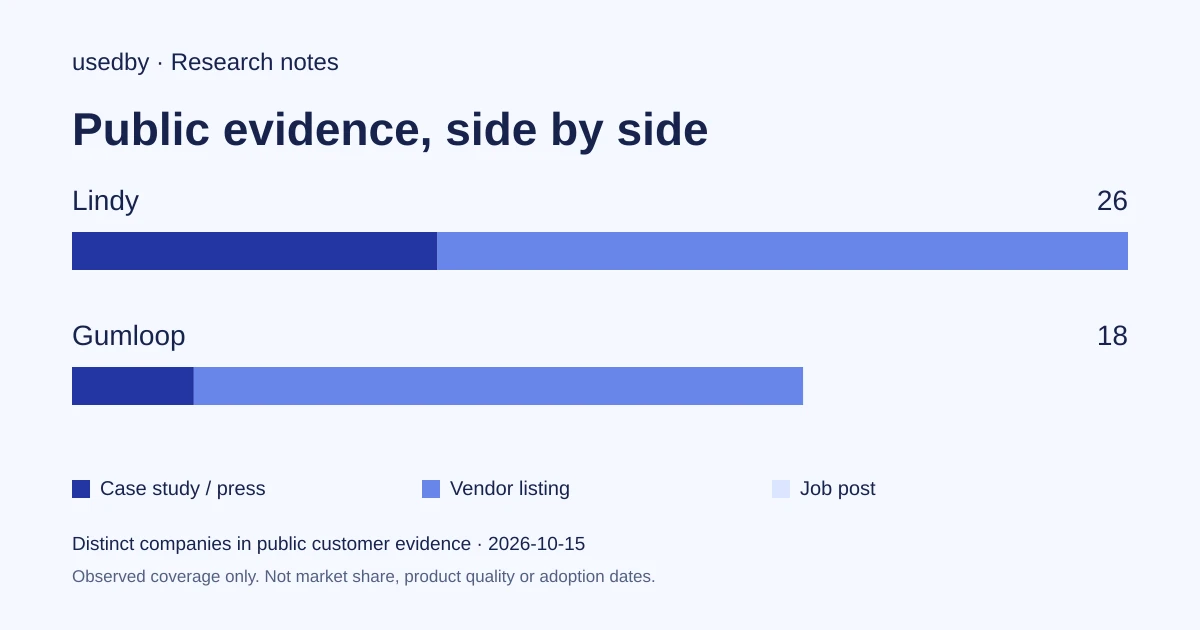
Gumloop and Lindy on the same collect, analyze and update journey, from vendor pages
| Criterion | Lindy | Gumloop |
|---|---|---|
| Building the flow | Routines from a sentence, 40+ skills, shared saved skills and editable plain-file memory.[3] [4] | Plain-language agents with app triggers, recurring tasks and skills; assistant can build or edit agents.[1] [2] |
| Actions and integrations | Claims 1,500+ integrations and MCP; works in Slack, email, iMessage; Usedby says 1,000+.[3] [4] | Homepage claims 400+ connectors, MCP tracking, agent browser and Salesforce write tools; Usedby says 150+.[1] [2] |
| Human approval | Approvals built in, revocable permissions and action log; audit logs listed under Enterprise.[3] [5] | Approvals, browser handoff, guardrails, spend-cap approvals and audit logs shown; guardrail scope depends on plan.[1] [2] |
| Errors and cost | Team $29.99 a month per active user for 3,000 credits; pauses when pool is low. Retry behavior not described.[3] [7] | Pro from $37 a month, 20k credits, 8% orchestration fee; agent health view. Retry behavior not described.[1] [6] |
Sources
The short answer
Both products are AI agents connected to business apps, with triggers or scheduled routines, reusable skills and approval steps. Neither page set promises full autonomy, so the real question is where each one puts the control. Gumloop leans toward central administration of agents and spend. Lindy leans toward a conversational teammate that lives in Slack, email and iMessage, priced per seat with credits.
If an operations lead needs to see every agent, cap what it spends and set rules across teams, start with Gumloop. If individuals want to hand work to a daily assistant and keep billing simple, start with Lindy. The sections below follow one journey through both: collect data in one app, analyze it, propose a change, and write it to a CRM or business tool.
Sources: gumloop.com · lindy.ai · Gumloop (usedby.ai) · Lindy (usedby.ai)
The journey we compare
Take a common task. An agent pulls call notes or usage data from one application, compares them with history, and drafts an update for a CRM record. A person reviews it before anything is written. We compare four things: how the flow is built, which actions and integrations it can use, where a human approves, and what happens to errors and cost.
This is an editorial framing, not a vendor benchmark. The customer examples below show how real teams shaped similar journeys. They are vendor-published and do not show that one product beats the other.
Sources: gumloop.com · lindy.ai · Fal ai (gumloop.com) · Tiddle transformed their influencer agency (lindy.ai)
Building the flow
Gumloop describes agents built in plain language by the people who understand the task, with app triggers, recurring tasks and skills. A product update dated October 7, 2026 says you can ask its assistant to build or change an agent, including instructions, connectors, skills and triggers. Its pricing page files older workflows under a legacy label, so agents are the current model.
Lindy describes routines created from a sentence, such as a morning brief or a Friday report. It ships with 40+ skills, lets you save a task done once as a skill for the whole team, and keeps memory in plain files you can open and edit. For a recurring collect-and-report job, that editable memory is a practical way to correct the agent without rebuilding it.
Sources: gumloop.com · Gumloop (usedby.ai) · lindy.ai · Lindy (usedby.ai)
Actions and integrations
Gumloop's homepage claims 400+ connectors, MCP call tracking and an agent browser that can click, type and download on sites without an API. It also lists 58 new Salesforce tools announced on October 9, 2026, including writing records in bulk. The Usedby profile says 150+ integrations, so the counts differ between pages. Opendoor's case study shows the browser in use: agents turn on utilities across provider portals, with logins held in a password vault.
Lindy's homepage and pricing page claim 1,500+ integrations and MCP support, while the Usedby profile says 1,000+. Its pricing page also lists Slack, email and iMessage access, and computer use on Pro and Max, although the visible plan cards show Free, Team and Enterprise. Treat the integration counts as vendor claims and check your specific CRM and tools, not the headline number.
Sources: gumloop.com · Gumloop (usedby.ai) · Opendoor (gumloop.com) · lindy.ai · Lindy (usedby.ai)
Where the human keeps control
Gumloop shows an agent waiting for approval before sending, human takeover of the browser, plain-English guardrails that block, tag or log actions before they run, spend caps with approval requests, and audit logs. Its pricing page says guardrails are scoped to the agent on Pro and to the organization on Enterprise. The fal case study is the clearest model for our journey: an agent proposes CRM updates from a call transcript and sales playbooks, and writes only after the salesperson accepts.
Lindy says nothing irreversible happens without approval, and its security page describes revocable permissions and a log of every action. Its pricing page lists audit logs, SSO and SCIM under Enterprise, so confirm which log detail your plan includes. Lindy states SOC 2 Type II. How finely approvals can be configured per action is not detailed in the pages we read.
Sources: Gumloop (usedby.ai) · Fal ai (gumloop.com) · Lindy (usedby.ai) · Security (lindy.ai)
Errors and cost
Gumloop Pro starts at $37 a month with a 14-day trial, 20k included credits and an 8% orchestration fee; Enterprise is custom. The homepage shows agent health, run evaluations and a model router, which are product descriptions rather than reliability measurements. Lindy's Free plan gives $50 in credits for 7 days. Team is $29.99 a month for 3,000 credits per active user, with top-ups at $10 per 1,000 credits. Lindy pauses and alerts you when the pool runs low, and admins can set allocations per seat.
Neither page set explains retry behavior after a failed step, and neither gives a cost per task. Lindy offers rough credit ranges per type of work, which helps budgeting but is not a guarantee. We recommend, as an editorial test and not a vendor feature, running one real journey on each free trial and noting what happens when a connection breaks and what it consumes.
Sources: Gumloop (usedby.ai) · Pricing (gumloop.com) · Lindy (usedby.ai) · Pricing (lindy.ai)
Which one fits which need
Choose Gumloop when many people will build agents and a central owner needs spend caps, guardrails and visibility, or when the work touches sites without an API. Choose Lindy when the agent should sit in Slack and email as a daily helper and seat-based credits are easier to explain. Vendor-reported results, such as Tiddle's 40 to 60 hours a week saved on inbound email or Blackbird's 10 to 20 hours on outbound prep, describe their own teams and metrics, not what you will get.
The two are not strict substitutes. A team could reasonably pilot both on the same journey, since both offer a free way to start.
Sources: gumloop.com · lindy.ai · Tiddle transformed their influencer agency (lindy.ai) · Blackbird (lindy.ai) · Pricing (gumloop.com) · Pricing (lindy.ai)
Method and limits
2026-10-15
This dated snapshot counts distinct companies in public customer evidence. CONFIRMED means a case study, named testimonial or press source; OBSERVED means a vendor listing; SIGNAL means a job post. All three count, but their strength differs. Removed and unlevelled lines are excluded. Examples are a capped selection verified within 90 days. Vendor facts are sourced records checked within 60 days. Coverage is uneven and missing evidence is unknown. These figures measure neither market share nor product performance; capture dates are not adoption dates.
Sources
- gumloop.comgumloop.com
- lindy.ailindy.ai
- Security (lindy.ai)lindy.ai
- Pricing (gumloop.com)gumloop.com
- Pricing (lindy.ai)lindy.ai
- Fal ai (gumloop.com)gumloop.com
- Tiddle transformed their influencer agency (lindy.ai)lindy.ai
- Opendoor (gumloop.com)gumloop.com
- Blackbird (lindy.ai)lindy.ai
Questions
Which is better for updating a CRM after a sales call?
Both can read data and propose changes. The fal case study on Gumloop shows an agent proposing CRM updates that a salesperson accepts before anything is written. Lindy's pages describe CRM updates and approvals, but give less detail on per-action settings, so test your CRM on both.
Are the integration counts comparable?
Not directly. Gumloop's homepage claims 400+ connectors while the Usedby profile says 150+. Lindy claims 1,500+ while Usedby says 1,000+. Check the specific apps and actions you need rather than the totals.
Can I try both before paying?
Yes. Gumloop lists a 14-day trial on Pro. Lindy lists a Free plan with $50 in credits that last 7 days, with no credit card required, according to its pricing page.
Do the customer results show which tool is better?
No. They are vendor-published figures from different companies with different metrics. They illustrate how teams structured their workflows and are not a head-to-head test.
Tools in this article


Explore the data
Who uses which AI tool, and how each line was found.