Gumloop, Lindy or Relevance AI: which to shortlist for an agent that takes a request, checks your tools and acts
Which no-code agent platform to shortlist when a request comes in, the agent reads your apps, then drafts or runs an action: Gumloop, Lindy or Relevance AI.
Vendor-published capabilities for a request-to-action business agent, from each product's current pages
| Criterion | Gumloop | Lindy | Relevance AI |
|---|---|---|---|
| Building agents | Builder plus an assistant that creates agents from a description; owner and user roles.[1] | 40+ skills, shared skills, scheduled routines, editable plain-file memory.[2] | Invent 2.0 and an embedded deployment team that maps use cases and deploys.[3] |
| Apps and actions | Homepage cites 400+ connectors (catalogue says 150+); agent browser; Salesforce write tools.[1] | Cites 1,500+ integrations (catalogue says 1,000+), MCP, computer use.[2] | Cites 2,000+ tools on the integrations page, 1,000+ on the homepage; event triggers.[3] [4] |
| Validation and errors | Plain-English action rules, spend approvals, audit logs, agent health view.[1] | Built-in approvals, action logging, revocable permissions.[2] | Human approvals, version control, full agent tracing, OTEL export.[3] |
| Costs and administration | Pro from $37 a month, 14-day trial, 8% orchestration fee; Enterprise custom.[1] [5] | $29.99 a month per active user for 3,000 credits; free credits; Enterprise custom.[2] [6] | SOC 2 Type II, GDPR, DPA listed; no price grid in the pages read.[3] [7] |
Sources
The job all three are built for
Picture one task. A request arrives in Slack, by email or through a trigger. An agent reads the connected apps, then prepares an action or carries it out, with a person approving where it matters. Gumloop, Lindy and Relevance AI all describe products for this kind of work, aimed at business teams rather than developers.
On their own pages, all three present no-code agent building, connections to company apps, triggers or scheduled routines, human approvals and SOC 2 Type II. They are not interchangeable, though. They differ in how an agent gets built, what control they publish, and how they charge. That is what decides a shortlist, not a ranking.
Sources: gumloop.com · lindy.ai · relevanceai.com · Security (lindy.ai) · trust.relevanceai.com
How each platform builds an agent
Gumloop describes a builder where you say what the agent should take care of, then set instructions, connectors, skills and triggers. A feature dated 7 October 2026 lets you ask its assistant, Gumball, to build or update an agent from a description. Agents have two roles: owners configure them, and users get a focused chat page.
Lindy positions itself as a teammate that lives in Slack, iMessage, email and the browser. It lists 40+ skills, lets you save a task done once as a shared skill, runs scheduled routines, and keeps memory in plain files you can open and edit. Its own homepage says it takes minutes to set up.
Relevance AI leans on guided deployment. Its homepage describes Invent 2.0 as a tool to identify what to automate and build reliable systems, plus an embedded deployment team. The vendor outlines use-case mapping in weeks one and two and a first team of agents from week three, and says some cases take only hours. If you want a partner rather than a self-serve tool, this is the clearest signal of the three.
Sources: gumloop.com · lindy.ai · relevanceai.com
Apps and actions: counts that disagree
Integration numbers differ between sources, so treat them as marketing ranges. Gumloop's homepage cites 400+ connectors while the catalogue summary says 150+. Lindy's homepage and pricing page cite 1,500+ integrations plus MCP support, against 1,000+ in the catalogue summary. Relevance AI's integrations page cites 2,000+ tools and lists 2,728, while its homepage says 1,000+.
A bigger number does not show depth. What matters is whether the specific action you need exists, such as writing a CRM field or filing a ticket. Gumloop highlights 58 new Salesforce tools that can write records and an agent browser that clicks and fills forms without an API. Lindy lists computer use and MCP. Relevance AI lists native or custom event triggers and off-the-shelf or custom actions. Test your own two or three actions in a demo.
Sources: gumloop.com · lindy.ai · relevanceai.com · Integrations (relevanceai.com)
Validation and errors: where a person steps in
Gumloop publishes the most detail on guardrails. It describes plain-English rules that block, tag or log an action before it runs, runs scored against rules you set, an agent health view, spend caps with approvals, audit logs and recorded browser sessions. Its health illustration is a product mock-up, not a measured error rate.
Lindy states that approvals are built in, that every action is logged, and that permissions can be set and revoked. Its homepage says nothing irreversible happens without approval. It does not describe an error-rate dashboard on the pages read.
Relevance AI lists human-in-the-loop approvals, version control, real-time monitoring, full agent tracing, cost visibility and OTEL export. Its demo table shows evaluation pass rates per task; that is an illustration, not a result you should expect.
Sources: gumloop.com · lindy.ai · relevanceai.com
Costs and administration
Gumloop lists Pro from $37 a month with a 14-day trial, 20k included credits, an 8% orchestration fee, and unlimited agents, seats and teams. Enterprise is custom. Its homepage cites SAML SSO, SCIM, roles, spend caps and VPC deployment. Which of these sit in which plan is not readable in the pricing text, so confirm that.
Lindy bills every active user: Free gives $50 in credits for 7 days, Team is $29.99 a month for 3,000 credits with top-ups at $10 per 1,000, and credits pool across the team. Enterprise adds SSO, SCIM, audit logs and a HIPAA business associate agreement. The cost grows with seats, and credits are consumed per task.
Relevance AI's trust centre lists SOC 2 Type II, GDPR, a data processing addendum and hosting in the US, EU and Australia. The pages read show demo and trial buttons but no price grid, so cost is the open question.
Sources: gumloop.com · Pricing (gumloop.com) · lindy.ai · Pricing (lindy.ai) · relevanceai.com · trust.relevanceai.com
What customer examples show, and what they do not
At fal, a vendor case study says an operations lead built a data-analysis agent in Slack, so colleagues ask questions without writing queries. A second agent proposes CRM updates after a sales call, and writes only after the salesperson accepts. Gumloop's homepage also reports Gusto adding $1.5M+ ARR in three months, a figure the vendor publishes.
Lindy's case studies centre on inboxes and phones. Tiddle reports 40 to 60 hours a week saved on inbound email, while the page itself mentions both about 500 and over 1,000 daily emails, so treat the volume as unclear. The Sauna Place reports up to 55% of inbound calls converted into leads.
Zembl, a Relevance AI customer, reviewed every email its first agent sent, starting at five leads a day and raising the volume, and later added helper agents for Salesforce and SMS. It reports 30% higher conversion. SafetyCulture reports 3x meetings booked. These are different metrics from different companies, so they do not rank the platforms.
Sources: Fal ai (gumloop.com) · gumloop.com · Tiddle transformed their influencer agency (lindy.ai) · The sauna place (lindy.ai) · Zembl (relevanceai.com) · Safetyculture (relevanceai.com)
Which to shortlist
Shortlist Gumloop if central oversight of usage, spend and permissions across many builders is your main worry, or you want a public entry price. Shortlist Lindy if you want an assistant inside Slack, iMessage and email, priced per active user. Shortlist Relevance AI if you want help from a deployment team and detailed tracing, and are willing to get a quote.
Editorial suggestion, not a vendor feature: run one real request through your shortlisted tools, including one write action and one refusal case, and ask each vendor to show where it logs and where it asks for approval.
Sources: gumloop.com · lindy.ai · relevanceai.com
Method and limits
2026-10-15
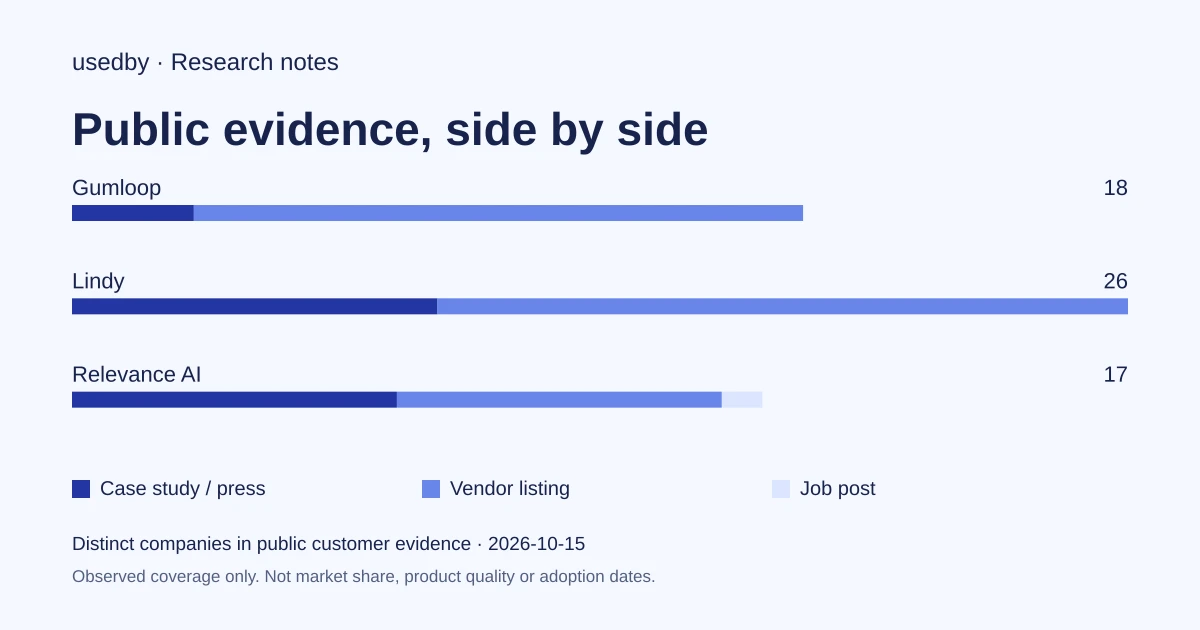
This dated snapshot counts distinct companies in public customer evidence. CONFIRMED means a case study, named testimonial or press source; OBSERVED means a vendor listing; SIGNAL means a job post. All three count, but their strength differs. Removed and unlevelled lines are excluded. Examples are a capped selection verified within 90 days. Vendor facts are sourced records checked within 60 days. Coverage is uneven and missing evidence is unknown. These figures measure neither market share nor product performance; capture dates are not adoption dates.
Sources
- gumloop.comgumloop.com
- lindy.ailindy.ai
- relevanceai.comrelevanceai.com
- Integrations (relevanceai.com)relevanceai.com
- Pricing (gumloop.com)gumloop.com
- Pricing (lindy.ai)lindy.ai
- trust.relevanceai.comtrust.relevanceai.com
- Security (lindy.ai)lindy.ai
- Fal ai (gumloop.com)gumloop.com
- Tiddle transformed their influencer agency (lindy.ai)lindy.ai
Questions
Which of the three has the clearest public starting price?
Gumloop lists Pro from $37 a month with a 14-day trial, and Lindy lists Team at $29.99 a month per active user for 3,000 credits. Relevance AI's pages read show no price grid, so its cost needs a quote. Credit usage and fees make real cost depend on your workload.
Do all three require a human to approve actions?
All three describe approvals. Lindy says approvals are built in, Gumloop describes approvals for costly actions and rules that block actions before they run, and Relevance AI lists human-in-the-loop approvals. How granular they are is something to check in a demo.
Are the integration counts comparable?
Not reliably. Each vendor gives a different figure on different pages, and the catalogue summaries differ from the homepages. A count says little about whether the specific action you need, such as a CRM write, is supported.
Do the customer results prove one tool is better?
No. They are vendor-reported figures from different companies, tasks and metrics, such as hours saved, conversion or meetings booked. They show the kinds of work each platform is used for, not a head-to-head comparison.
Tools in this article



Explore the data
Who uses which AI tool, and how each line was found.