ChatGPT or Claude for analyzing documents as a team and sharing one summary
Which assistant fits a team that loads several documents, finds key passages and shares a summary? A comparison based on what each vendor documents.
The scenario: several documents, one shared summary
Picture a team that has to read a stack of contracts, reports or notes, pull out the passages that matter, work in a common space and hand over one synthesis. Both ChatGPT and Claude are general assistants with project workspaces, so both can be shortlisted. Neither wins on every point. Claude's documentation is more precise about file formats, file limits, project sharing rights and published security attestations. ChatGPT's documentation puts more weight on finished deliverables through ChatGPT Work, plugins for tools such as Google Drive, SharePoint and Slack, and administrator controls.
This comparison follows the vendors' current documentation, not a head-to-head test. We make no claim about which assistant reads or summarizes better. Where a page gives no figure, that means the figure was not in the page we read, not that the feature is missing.
Sources: 8241126 upload files to claude (support.claude.com) · Use chatgpt (learn.chatgpt.com)
Loading documents: formats, limits and context
Claude's help page lists the supported documents: PDF, DOCX, CSV, TXT, HTML, ODT, RTF, EPUB, JSON and XLSX. XLSX requires code execution and file creation to be enabled in the account. In a chat, the stated limits are 500 MB per file, up to 20 files and PDFs of up to 1,000 pages. Claude analyzes both text and visuals in PDFs of 100 pages or fewer; for 101 to 1,000 pages it processes text only. Non-PDF documents are text-only, so embedded images are not read.
Project files are stricter: 30 MB per file, with no fixed file count but a total that must fit within Claude's context window. For a team, that means a large report belongs in a chat or must be split, while a stable reference set belongs in a project.
ChatGPT's documentation says you can attach documents, presentations, spreadsheets, PDF files, images and data exports, then ask it to summarize or compare them, find inconsistencies, or extract and reorganize information. The page we read gives no numeric size or page limits, so the two tools cannot be compared on capacity from these sources. ChatGPT can also pull in material through plugins such as Google Drive, SharePoint or Salesforce, which may suit teams whose documents already live in those systems.
Sources: 8241126 upload files to claude (support.claude.com) · Use chatgpt (learn.chatgpt.com)
Organizing the work: projects, instructions and deliverables
Claude projects are self-contained workspaces with their own chat histories, knowledge and instructions. Instructions apply to every chat in the project. Context is not shared between chats unless it is added to the project knowledge. On paid plans, Claude automatically turns on retrieval (RAG) when project knowledge nears the context limit, which Anthropic says expands capacity by up to 10 times. Each project also has its own memory. Note that a separate, newer version of projects is rolling out in beta, starting with Claude Code, and should not be confused with the chat experience described here.
ChatGPT projects group chats, uploaded files, instructions and connected sources, and project instructions apply across chats. The documentation advises starting a separate chat for each distinct outcome. In the desktop app, local projects can connect to folders on a computer, but ordinary ChatGPT projects do not automatically reach local folders.
The bigger difference is ChatGPT Work. It can use files, plugins and approved tools to produce reviewable results such as briefs, decks and analyses, and it supports scheduled tasks for recurring updates. For a synthesis that must become a slide or a spreadsheet, this is a direct fit. Availability depends on plan, platform, region and workspace settings.
Sources: 9517075 what are projects (support.claude.com) · 9519177 how can i create and manage projects (support.claude.com) · Projects (learn.chatgpt.com) · Get started with work (learn.chatgpt.com) · Use chatgpt (learn.chatgpt.com)
Sharing and controls
On Team and Enterprise plans, Claude projects can be shared by email, in bulk or with the whole organization. Members get either view or edit rights: viewers can read the contents and chat inside the project, editors can change instructions and knowledge. Owners can turn sharing off, and on Enterprise they can do so for specific roles. Free accounts have no sharing.
Anthropic's Trust Center lists SOC 2 Type 2, ISO 27001 and ISO 42001 for Claude Team and Claude Enterprise, HIPAA for Enterprise but not Team, and a data processing addendum. These are vendor-published statements; they do not by themselves establish your own legal compliance.
For ChatGPT, the documentation says workspace administrators can control access to ChatGPT Work, plugins, browser use and network access. The pages we read describe sharing only for read-only snapshots of Codex threads, limited to workspace members if the account is a workspace account, and administrators can switch those links off. They do not describe sharing a ChatGPT project between members, so confirm that point for your plan.
Sources: 9519177 how can i create and manage projects (support.claude.com) · 9517075 what are projects (support.claude.com) · trust.anthropic.com · Use chatgpt (learn.chatgpt.com) · Projects (learn.chatgpt.com)
Limits and cost
Claude's projects are open to everyone, but free accounts are capped at five. Retrieval and sharing depend on paid or Team and Enterprise plans. Project use draws from the plan's usage allowance, and running several threads in parallel uses it faster.
ChatGPT Work and Codex share usage limits, and longer or more complex tasks may use more credits. The documentation suggests stronger models for demanding work and lighter ones for simpler tasks, so model choice affects cost. We leave out price figures here; check the vendors' current plan pages before budgeting.
Sources: 9517075 what are projects (support.claude.com) · Use chatgpt (learn.chatgpt.com) · Get started with work (learn.chatgpt.com)
Which fits which team
Lean toward Claude if the team wants a shared document base with known limits: stated formats, per-file caps, explicit view and edit roles and a published security page to hand to a review board. Lean toward ChatGPT if the end product is a deck, spreadsheet or recurring report built from documents in Drive, SharePoint or Slack, and if administrator controls over plugins and tools matter most. The two are not interchangeable in documentation emphasis, and some teams may use each for a different step.
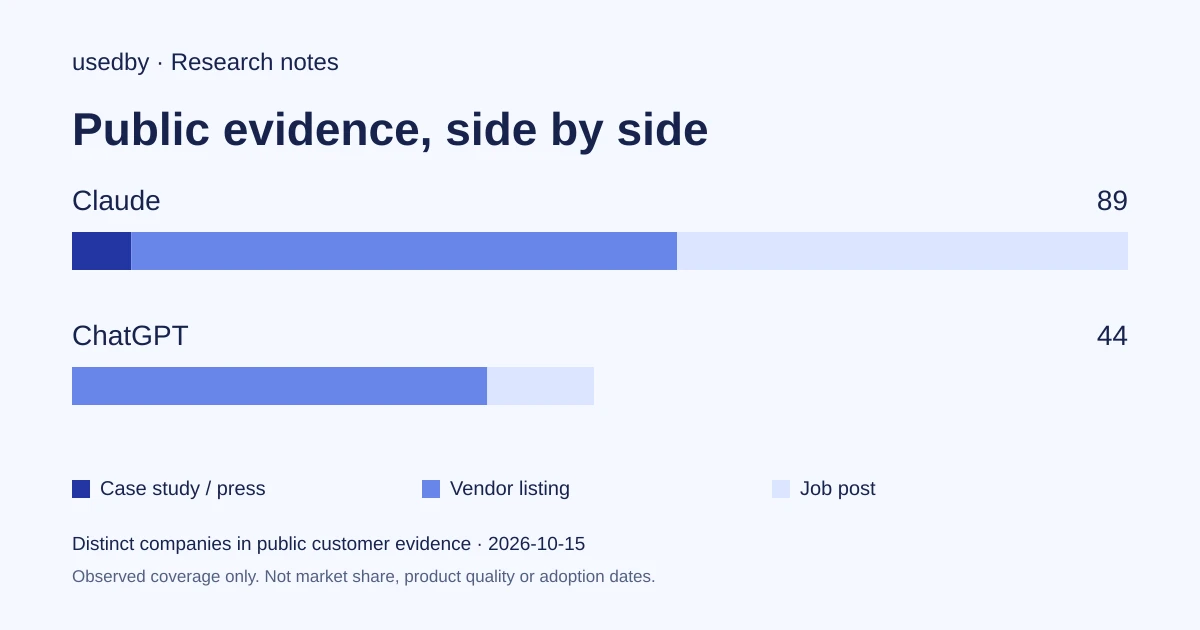
Our editorial suggestion, not a vendor feature: run the same small, non-sensitive document set through both, ask each to cite the passages it relied on, and have two reviewers check the citations against the originals. Large public customer counts say nothing about which one reads your documents better.
Sources: 8241126 upload files to claude (support.claude.com) · 9519177 how can i create and manage projects (support.claude.com) · Get started with work (learn.chatgpt.com) · Use chatgpt (learn.chatgpt.com)
Method and limits
2026-10-15
This dated snapshot counts distinct companies in public customer evidence. CONFIRMED means a case study, named testimonial or press source; OBSERVED means a vendor listing; SIGNAL means a job post. All three count, but their strength differs. Removed and unlevelled lines are excluded. Examples are a capped selection verified within 90 days. Vendor facts are sourced records checked within 60 days. Coverage is uneven and missing evidence is unknown. These figures measure neither market share nor product performance; capture dates are not adoption dates.
Sources
- 8241126 upload files to claude (support.claude.com)support.claude.com
- Use chatgpt (learn.chatgpt.com)learn.chatgpt.com
- 9517075 what are projects (support.claude.com)support.claude.com
- 9519177 how can i create and manage projects (support.claude.com)support.claude.com
- Projects (learn.chatgpt.com)learn.chatgpt.com
- Get started with work (learn.chatgpt.com)learn.chatgpt.com
- trust.anthropic.comtrust.anthropic.com
Questions
Which tool documents clearer file limits for team document work?
Claude. Its help page states supported formats, 500 MB per chat file, 20 files per chat, a 1,000-page PDF cap and 30 MB per project file. The ChatGPT page we read lists file types but no numeric limits, so those need confirming.
Can a team share a project in each tool?
Claude documents project sharing on Team and Enterprise plans, with view and edit roles and administrator controls. For ChatGPT, the pages we read cover read-only Codex thread snapshots and administrator controls over Work and plugins, not project sharing, so verify it for your plan.
Which one produces a ready-to-review presentation or spreadsheet?
ChatGPT Work is documented for this: it uses files, plugins and approved tools to create briefs, decks and analyses that you review. Claude's documentation we read focuses on projects and files rather than deliverable workflows, so this is a documentation difference, not a proven quality gap.
Does this article say which assistant analyzes documents better?
No. It compares documented features only. No common test was run, so output quality, accuracy on long documents and citation reliability remain untested here and should be checked on your own files.
Tools in this article


Explore the data
Who uses which AI tool, and how each line was found.