From a shared tracker to a dependable Airtable app: data model, views, automations, permissions
How to turn a shared spreadsheet into a multi-team Airtable app in four steps, with plan limits to check and AI features kept separate from the core.
When a shared tracker stops being enough
Airtable describes itself as a low-code platform that pairs the simplicity of a spreadsheet with the power of a database, aimed at teams building custom apps for workflows and project management. The practical question is when a shared tracker deserves that treatment.
The usual signs are familiar: several copies of the same file, statuses that mean different things to different people, and requests that arrive by chat instead of through a form. Code and Theory, a creative agency, described exactly this in its customer story. Producers each ran their own systems, contracts reached legal review without context, and gathering data for leadership took heavy manual effort. The story is Airtable's own, so treat its results as vendor-reported.
This guide follows a four-step order: data model, views and interfaces, automations, then permissions and operations. AI features are covered separately because the product pages present them as plan-dependent options, not a prerequisite.
Sources: airtable.com · Code and theory (airtable.com) · Pricing (airtable.com)
Step one: build the data model before the screens
Start by separating what your tracker mixes together: projects, tasks, contracts, people and clients become linked tables, not columns in one sheet. Everything downstream, from filters to permissions, is easier when each thing lives in one place.
Code and Theory gave each producer a project-management base connected to a production handbook app. Using Airtable's sync feature, data then flowed into a single base that tracks project health, the sales pipeline, invoices and a master schedule. Schaeffler used a parent-child app model: local teams manage their own work while feeding structured data into a global calendar. Both show the same idea, local ownership with a shared roll-up.
Size matters early. The pricing page lists 1,000 records per base on Free, 50,000 on Team, 125,000 on Business and 500,000 on Enterprise Scale, and gives the Enterprise Scale plan a HyperDB feature. It also lists standard sync on Team, with premium and two-way sync on Business. Estimate your row counts and whether teams need separate bases that sync.
Sources: Code and theory (airtable.com) · Schaeffler (airtable.com) · Pricing (airtable.com)
Step two: views by role, then interfaces
Once the data is linked, give each audience its own lens. The pricing page lists grid, kanban, calendar, gallery, list, dashboard and form visualizations, plus Interface Designer, which is included even on the Free plan. Gantt and timeline views appear from Team upward.
Code and Theory used personalized views so producers see only what concerns them, and forms to standardize contract intake so legal stops asking the same questions repeatedly. It also built a dashboard for reviewing and approving contracts. The lesson is that forms fix the entry point and views fix the reading experience; interfaces are for people who should not touch the underlying grid.
For outside collaborators, the pricing page lists Portals as a paid add-on, starting at $120 a month for 15 guests on Team and $150 on Business, with a footnote giving $127.50 for Business on the annual plan. Check this early if clients or vendors need to see anything.
Sources: Pricing (airtable.com) · Code and theory (airtable.com)
Step three: automate the handoffs
Automate only after the structure is stable. At Code and Theory, the legal team used to edit a daily email by hand to report contract status. The story says automations now share status updates, and reminders through Slack and email start five business days before a Letter of Engagement expires. That is a concrete pattern: a date field, a rule and a notification.
Plan limits shape this step. According to the pricing page, automation runs per month are 100 on Free, 25,000 on Team, 100,000 on Business and 500,000 on Enterprise Scale, with 75 to 200 automations per base depending on plan. External email recipients per day are limited to collaborators on Free, 100 on Team and 1,000 on Business. A reminder flow that emails clients can hit these ceilings, so count expected runs first.
Sources: Code and theory (airtable.com) · Pricing (airtable.com)
AI options, kept separate from the core
Airtable's home page promotes AI agents, a conversational builder called Omni, and a choice of model providers. The pricing page ties this to AI credits: 500 per editor each month on Free, 15,000 per paid user on Team, 20,000 on Business and 25,000 on Enterprise Scale at list price, plus credit packs. Omni and AI Field Agents appear there as new features, but the page text does not make clear which plan includes each one, so confirm that in a demo.
The case studies show what AI fields can do once the structure exists. OpenAI's product operations team keeps one project record per feature with weekly updates from each lead; AI fields summarize those updates across 50 to 60 projects and flag mismatches with logged milestones, according to the story. Schaeffler reports using agents to match requests to designers and score content against strategic themes. These are vendor-published accounts, not tests, and the stories do not state credit consumption.
Sources: airtable.com · Pricing (airtable.com) · Openai (airtable.com) · Schaeffler (airtable.com)
Step four: permissions and running the app
The pricing page lists field and table editing permissions, personal and locked views, granular interface permissions and password or domain-restricted shares. It lists an admin panel, SAML single sign-on, an app sandbox and AI admin controls from Business, and audit logs, data loss prevention and enterprise key management on the security side. Which of these sits in which plan is hard to read from the flattened table, so confirm each one you need.
Revision history differs by plan: two weeks on Free, one year on Team, two years on Business and three or more years on Enterprise Scale. Airtable's trust page also describes record-level revision history.
On security, Airtable says it has undergone a SOC 2 Type 2 audit, offers European Union data storage as an option, and lets customers sign a data processing addendum. Its home page says no customer data is retained or used to train AI models and that models run in Airtable's AWS environment; treat these as vendor statements.
Sources: Pricing (airtable.com) · Trust and security (airtable.com) · airtable.com
Choosing a plan and what to ask in a demo
Small teams with one shared base, forms and a few automations can test on the free plan, which the pricing page lists with up to five editors. Multi-team apps that need sync, higher record counts and heavier automation will likely look at Team or Business. Enterprise Scale fits when governance, audit logs and very large bases drive the decision.
Editorial suggestion, not a vendor claim: prototype one real workflow end to end, such as intake form, linked tables, a role view and one reminder, and compare it with your record and run counts. In the demo, ask which AI features your plan includes, how credits are consumed, and how the Slack integration behaves, since we did not review its documentation.
Sources: Pricing (airtable.com) · Code and theory (airtable.com)
Method and limits
2026-10-15
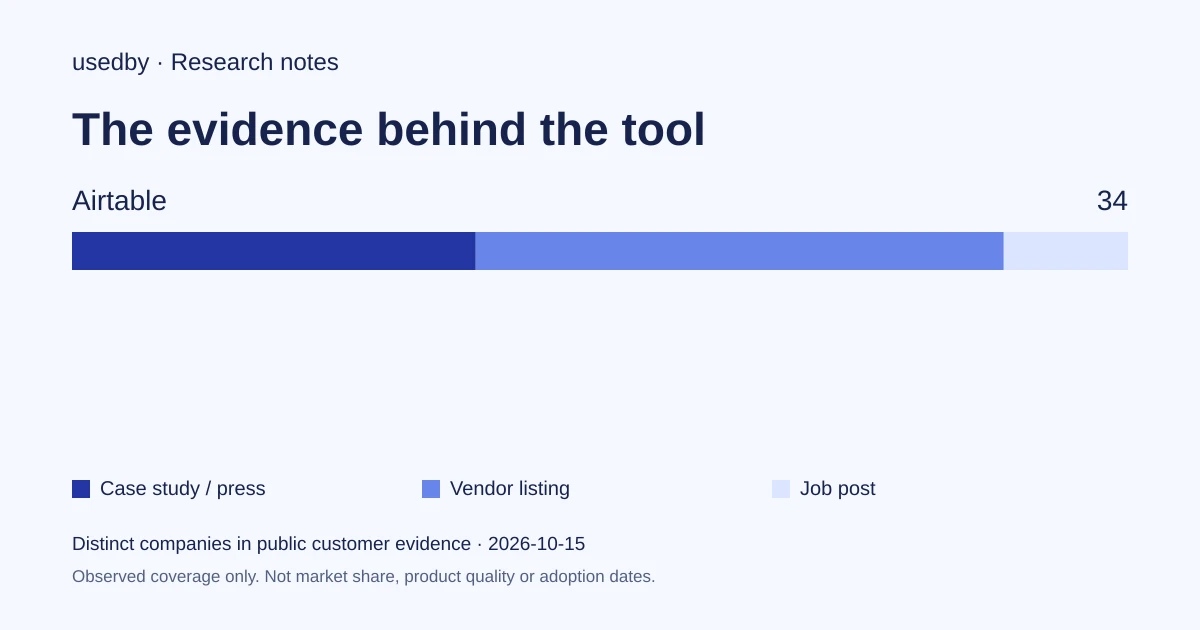
This dated snapshot counts distinct companies in public customer evidence. CONFIRMED means a case study, named testimonial or press source; OBSERVED means a vendor listing; SIGNAL means a job post. All three count, but their strength differs. Removed and unlevelled lines are excluded. Examples are a capped selection verified within 90 days. Vendor facts are sourced records checked within 60 days. Coverage is uneven and missing evidence is unknown. These figures measure neither market share nor product performance; capture dates are not adoption dates.
Sources
- airtable.comairtable.com
- Code and theory (airtable.com)airtable.com
- Pricing (airtable.com)airtable.com
- Schaeffler (airtable.com)airtable.com
- Openai (airtable.com)airtable.com
- Trust and security (airtable.com)airtable.com
Questions
Can I try Airtable before paying?
Yes. The pricing page lists a Free plan and free trials for paid tiers. Free is limited to 1,000 records per base, five editors and 100 automation runs, so it suits a prototype of one workflow, not a multi-team rollout.
Do I need the AI features to build a reliable tracker app?
No. Linked tables, views, forms, Interface Designer and automations are the core. AI credits, Omni and AI Field Agents are options whose availability depends on the plan, so confirm what your plan includes before relying on them.
What security information does Airtable publish?
Airtable says it has completed a SOC 2 Type 2 audit, offers European Union data residency and provides a data processing addendum to sign. These are vendor statements; request the report and contract terms for your own review.
Are the customer results in this article benchmarks?
No. The Code and Theory, Schaeffler and OpenAI figures come from Airtable-published stories, with different populations and metrics. They show how teams structured work, not what you should expect.
Tools in this article

Explore the data
Who uses which AI tool, and how each line was found.