Airtable or Notion for tracking a team process with statuses, owners, documents and reminders
Airtable suits linked records and quota-backed automations. Notion suits processes where documents and decisions matter as much as statuses.
Airtable and Notion compared on four criteria for tracking a team process, from vendor pages
| Criterion | Airtable | Notion |
|---|---|---|
| Data structure | Bases with record caps: 1,000 (Free) to 500,000 (Enterprise Scale); synced tables, two-way sync from Business.[1] | Databases from Free with subtasks, dependencies, properties; granular permissions on Business. No record cap published.[2] |
| Associated documentation | Attachments (1 GB to 1,000 GB per base) and revision history from 2 weeks to 3+ years.[1] | Pages and blocks, page history 7 days to unlimited, verified pages on Business.[2] |
| Views and automations | Grid, Kanban, Calendar, Gallery, Forms; 100 to 500,000 automation runs a month by plan.[1] | Charts, forms, dashboards; buttons on Free, database automations from Plus; no run quota listed.[2] |
| Access and pricing | $20 Team and $45 Business per seat monthly, billed annually; paid guest Portals; SSO plan differs between two pages.[1] [3] | $0, $10, $20 per member monthly; unlimited guests on paid plans; data residency Enterprise only.[4] [2] |
The short answer, and the process we compare
Both tools can track statuses, owners, views and automations. The choice depends on where the process is heavy. Choose Airtable when the work is mostly linked records, you expect volume, and you want published limits on records and automation runs. Choose Notion when the reference pages, decisions and written context around each request matter as much as its status.
To keep this concrete, picture one illustrative process. Requests come in, each with a status and an owner. Supporting files and a reference document sit beside each request, and a reminder goes out when something stalls. This is an editorial scenario, not a vendor use case. We compare it on four criteria from each vendor's public pages: data structure, associated documentation, views and automations, and access and pricing.
Sources: airtable.com · notion.com
Data structure: linked records versus databases inside pages
Airtable describes itself as a spreadsheet-simple platform with the power of a database. Its pricing page gives the limits: unlimited bases, but records per base are capped at 1,000 on Free, 50,000 on Team, 125,000 on Business and 500,000 on Enterprise Scale. It also lists synced tables, two-way sync from Business, and dynamic filtering for linked records. For a request tracker that will grow, those numbers are easy to check against your expected volume.
Notion's databases are included from the Free plan, with subtasks, dependencies, custom properties and filtering. Business adds granular database permissions, and the pricing page also lists connected properties and one-way database syncs. That page does not state a per-database record cap, so for a very large tracker the limit is unknown rather than absent.
Sources: airtable.com · notion.com · Pricing (notion.com)
Documentation: attachments and history versus pages and verification
In Airtable, supporting material mostly lives as attachments: 1 GB per base on Free, 20 GB on Team, 100 GB on Business and 1,000 GB on Enterprise Scale. Revision history runs from two weeks on Free to more than three years on Enterprise Scale. The trust page adds a record-level revision history. The pages we read do not describe a long-form document editor, so we do not claim one.
Notion is built around pages and blocks. File uploads are limited to 5 MB on Free and unlimited above it. Page history is 7 days on Free, 30 on Plus, 90 on Business and unlimited on Enterprise. Business adds a feature to verify pages, which suits reference documents that must stay current. Notion's own pages position it as a knowledge base with enterprise search in beta.
Sources: airtable.com · notion.com
Views and automations: what each pricing page quantifies
Airtable lists Grid, Kanban, Calendar, Gallery, Dashboard, Inbox and Forms views, with Gantt and timeline from Team. Automations are quantified: 75 to 200 per base and 100 to 500,000 runs a month depending on the plan. The Free plan allows 100 runs, so reminders on a real process quickly point to a paid tier. Slack is the integration listed for Airtable.
Notion lists charts, dashboards and forms: basic forms on Free, custom forms from Plus, and conditional logic in forms from Business. Automations are buttons only on Free, with custom database automations from Plus. The pricing page gives no run quota. Custom Agents use Notion credits, free to try and then $10 per 1,000 credits according to the vendor. Listed integrations include Slack, Google Drive, GitHub, Jira, Linear and Figma.
Sources: airtable.com · notion.com · Pricing (notion.com)
Access, pricing and security
Airtable's Free plan allows up to 5 editors. Team costs $20 per seat a month billed annually, and Business $45. Enterprise Scale is priced on request. Guests come through Portals, a paid add-on from $120 a month for 15 guests on Team. Airtable reports SOC 2 Type 2, an option to store data in the European Union, and a signable data processing agreement. One point conflicts: the trust page ties SAML single sign-on to the Enterprise plan, while the pricing page lists it under Business. Confirm which applies before relying on it.
Notion costs $0 on Free, $10 on Plus and $20 on Business per member a month, with Enterprise on request. Free allows 10 external guests, and paid plans list unlimited guests. SAML SSO is listed from Business, while data residency is limited to Enterprise. The vendor says a data processing agreement is available, that it undergoes SOC 2 and ISO 27001 audits, and that customer data is not used to train AI models by Notion or its subprocessors.
Sources: Trust and security (airtable.com) · Pricing (airtable.com) · Pricing (notion.com) · Security (notion.com)
What customer workflows show
Code and Theory, a creative agency, used Airtable forms to standardize contract intake for its legal team, then built a contract tracker with automations. According to Airtable's case study, reminders go out through Slack and email starting five business days before a Letter of Engagement expires, replacing a manually edited daily email. The director's own estimate is at least 10,000 hours saved a year across roughly 500 people. OpenAI's product operations team tracks each feature as a project with milestones and weekly updates, which Airtable AI fields summarize across 50 to 60 projects. Both are record-and-status processes.
Notion's stories lean on context. Faire says its product teams keep roadmaps, specifications and sprints in linked databases that sync with Jira, GitHub and Figma. The company reports workflows more than 30% faster and an average of 9 hours saved weekly. Clay describes Custom Agents that watch Slack, summarize incidents and send daily briefs, with 80+ agents rolled out in a week. These are vendor-published results from different companies and definitions, so they illustrate use, not a head-to-head comparison.
Sources: Code and theory (airtable.com) · Openai (airtable.com) · Faire (notion.com) · Clay (notion.com)
Which to choose
Lean towards Airtable if your process is a pipeline of linked records, you need clear automation and record limits to budget against, and attachments and revision history are enough as documentation. Lean towards Notion if each request comes with specs, decisions or meeting notes that people must read and keep current, and you value verified pages and knowledge search alongside statuses.
Some teams use both: OpenAI appears as a customer of each in public sources. Before committing, check the SSO plan for Airtable, the automation volume you need, and whether Notion's missing published record and run quotas matter at your scale.
Sources: airtable.com · notion.com · Openai (airtable.com) · Ai (notion.com)
Method and limits
2026-10-15
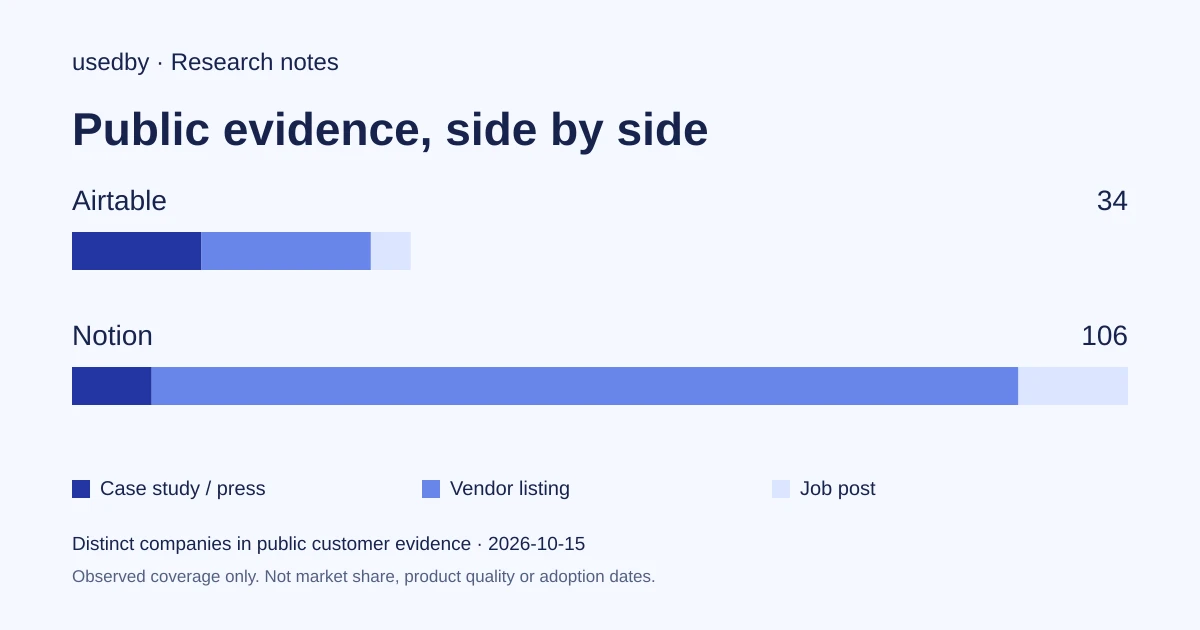
This dated snapshot counts distinct companies in public customer evidence. CONFIRMED means a case study, named testimonial or press source; OBSERVED means a vendor listing; SIGNAL means a job post. All three count, but their strength differs. Removed and unlevelled lines are excluded. Examples are a capped selection verified within 90 days. Vendor facts are sourced records checked within 60 days. Coverage is uneven and missing evidence is unknown. These figures measure neither market share nor product performance; capture dates are not adoption dates.
Sources
- airtable.comairtable.com
- notion.comnotion.com
- Pricing (airtable.com)airtable.com
- Pricing (notion.com)notion.com
- Trust and security (airtable.com)airtable.com
- Security (notion.com)notion.com
- Code and theory (airtable.com)airtable.com
- Openai (airtable.com)airtable.com
- Faire (notion.com)notion.com
- Clay (notion.com)notion.com
Questions
Can Notion replace Airtable for a request tracker?
For many teams, yes. Notion databases support statuses, owners, dependencies, forms and database automations from Plus. The open questions are scale and automation volume, because the pricing page lists no record cap or run quota.
Does Airtable limit how many records and automations I can use?
Yes. Its pricing page lists record caps per base from 1,000 on Free to 500,000 on Enterprise Scale, and monthly automation runs from 100 to 500,000 depending on the plan.
Which tool is better for security reviews?
Both vendors report SOC 2 audits and offer a data processing agreement. Airtable offers an EU data residency option, while Notion limits data residency to Enterprise. Airtable's pages disagree on which plan includes SAML SSO, so verify that point.
Do companies use both tools?
Some do. In the public customer data, four companies are listed on both, including OpenAI. Counts of customers are not market share or preference.
Tools in this article

Explore the data
Who uses which AI tool, and how each line was found.