From scattered documents to a Notion knowledge base that Notion AI can answer from
How to turn scattered docs into a Notion workspace Notion AI can query, which plan documents which controls, and where the limits and unknowns remain.
The need: one answer spread over many places
The typical problem is simple. The answer to a question sits in a wiki page, a ticket, a Slack thread and a shared drive, and someone has to read all of them. Notion presents itself as a workspace that combines notes, docs, wikis and project management, with Notion AI adding writing help, summarization and Q&A across the workspace.
This guide follows that need step by step: gather, structure, connect, restrict, keep fresh, then ask. Each step is tied to what Notion's own pages document, by plan. Customer stories are used only to illustrate the approach, not as measurements you should expect to reproduce.
Sources: notion.com · Pricing (notion.com)
Steps 1 and 2: gather and structure before you ask
The pricing page lists databases with subtasks, dependencies and custom properties on every plan, including Free. Pages and blocks are unlimited on paid plans, and file uploads are unlimited on Plus and above; the Free plan caps uploads at 5 MB and limits blocks for teams of two or more. Page history runs 7 days on Free, 30 on Plus, 90 on Business and unlimited on Enterprise.
Faire's customer story shows the organizing logic. Its engineering, product and design teams keep roadmaps, specs and sprints in linked databases that sync with Jira, GitHub and Figma, and Faire says Notion AI draws on that structure plus conversations from Slack and email. Faire's own lesson is to connect and organize knowledge before adding AI. This is the vendor's account, but the principle is easy to apply: if no one can say where the current version of a document lives, an assistant will not know either.
Sources: Pricing (notion.com) · Faire (notion.com)
Step 3: connect other tools, and know what each plan includes
The AI product page describes Enterprise Search as finding answers across apps such as Slack, Google Drive and GitHub. The pricing page marks Enterprise Search as Beta and lists it from the Business plan, with a limited trial on lower tiers. Notion Agent and AI Meeting Notes also start at Business.
Plus ($10 per member per month) offers basic connections; Business ($20) adds premium connections; Enterprise adds advanced connections and security connections such as DLP and SIEM. Custom Agents, which automate repetitive tasks, require Notion credits: the pricing page says they are free to try, then $10 per 1,000 monthly credits.
Sources: Pricing (notion.com) · notion.com
Step 4: restrict access by plan
Per the pricing page, Business adds private teamspaces, granular database permissions, SAML SSO and domain verification. Enterprise adds SCIM provisioning, audit log, domain management, and zero data retention with LLM providers. The AI product page says you control what Notion AI can see and do, and describes governance tools that give an overview of AI actions.
On data, Notion states that customer data is never used to train AI models by Notion or its subprocessors. Retention with LLM providers is 30 days for non-Enterprise plans and zero for Enterprise. Data residency in a chosen region is Enterprise only. A data processing agreement is available, and a BAA is offered to Enterprise customers subject to HIPAA. These are vendor statements, not a judgement on your legal compliance.
Sources: Pricing (notion.com) · notion.com · Security (notion.com)
Step 5: keep content fresh, and what Baseten shows
The Business plan lists Verify any page. The pricing page does not explain how it works, so treat it as a feature to examine in a demo rather than a guarantee of fresh answers. Pairing it with a named owner per space and a review rhythm is an editorial recommendation, not a Notion feature.
Baseten's case study describes several separate agents. For sales, katzgpt is a Custom Agent modeled on the first account executive. It connects through MCP to Salesforce, Gong, past Slack conversations and Notion, and answers in a Slack channel where the sales team asks questions. Baseten says it cut response time on those questions from an average of 30 minutes to about 20 seconds.
Two other agents are different. A recruiting agent answers process questions from new hires and sends a Friday market brief to Slack. A sales-reporting agent scans Slack conversations daily, writes knowledge base articles, organizes them and suggests owners. The 30-minute-to-20-second figure is a vendor-published result for the sales agent at one company, not a benchmark.
Sources: Pricing (notion.com) · Baseten (notion.com)
Limits and unknowns
Answer quality on your own content, how completely each connection covers your sources, and how many credits your usage will consume can only be judged on your own data. Faire reports that 71% of surveyed employees call Notion AI their most valuable AI tool and estimates an 8x return on its Enterprise plan; those are company-reported results from a workspace with about seven years of organized content, which may not resemble yours.
In a demo, try your own documents: pick ten real questions, include some whose answers changed recently, and see whether the cited sources are current and whether restricted pages stay hidden from users without access. This is an editorial suggestion, not a vendor capability.
Sources: Faire (notion.com) · notion.com
Who should start where
A small team with mostly non-sensitive content can try Free or Plus, where AI is a limited trial, to test the structure. Teams that need private teamspaces, database-level permissions, SSO, page verification and Enterprise Search beta should look at Business. Organizations needing zero retention, SCIM, audit logs, residency or a BAA should talk to sales about Enterprise.
Whatever the plan, start with one team and one body of documentation, such as support or onboarding. Clean it up, assign owners, then connect other tools. A narrow start makes it easier to see whether answers are useful before you pay for wider access. This sequence is an editorial recommendation.
Sources: Pricing (notion.com)
Method and limits
2026-10-15
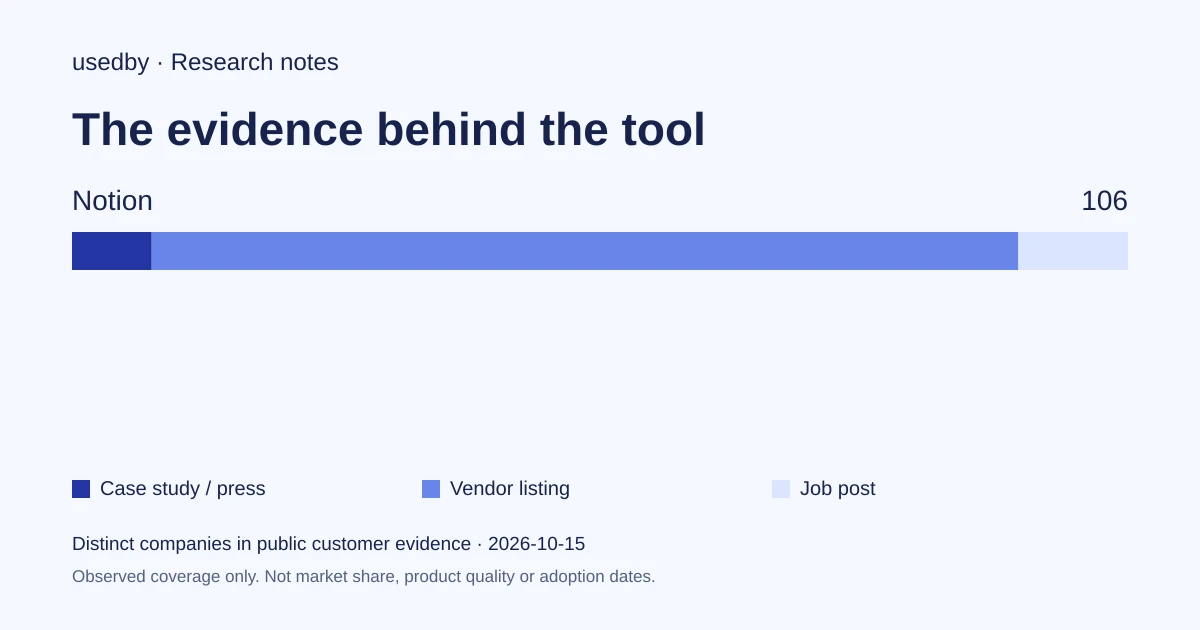
This dated snapshot counts distinct companies in public customer evidence. CONFIRMED means a case study, named testimonial or press source; OBSERVED means a vendor listing; SIGNAL means a job post. All three count, but their strength differs. Removed and unlevelled lines are excluded. Examples are a capped selection verified within 90 days. Vendor facts are sourced records checked within 60 days. Coverage is uneven and missing evidence is unknown. These figures measure neither market share nor product performance; capture dates are not adoption dates.
Sources
- notion.comnotion.com
- Pricing (notion.com)notion.com
- Faire (notion.com)notion.com
- Security (notion.com)notion.com
- Baseten (notion.com)notion.com
Questions
Which Notion plan includes Enterprise Search?
The pricing page lists Enterprise Search, marked Beta, from the Business plan at $20 per member per month, with a limited trial on lower tiers. Check the current status with Notion before relying on it.
Does Notion use my data to train AI models?
Notion states that customer data is never used to train AI models by Notion or its subprocessors. This is the vendor's statement; the security page and DPA terms are the place to confirm details.
How long is data retained by AI providers?
According to Notion, retention with LLM providers is 30 days for non-Enterprise plans and zero for Enterprise.
Is there a free option to test?
Yes. A free plan exists at $0, and Free and Plus include a limited trial of Notion AI.
Tools in this article
Explore the data
Who uses which AI tool, and how each line was found.